Buying
Buy a token in a couple of taps, funded by the frBTC you hold or the BTC you deposit, with slippage, fee tiers, a preview, live status, and built-in revert protection.
Buying a token takes a couple of taps. You pick an amount, and the bot quotes the trade, builds the Bitcoin transaction, signs it, and broadcasts it. There is no wallet pop-up and nothing to sign by hand. You watch it land, then your position is right there.
How you reach a buy
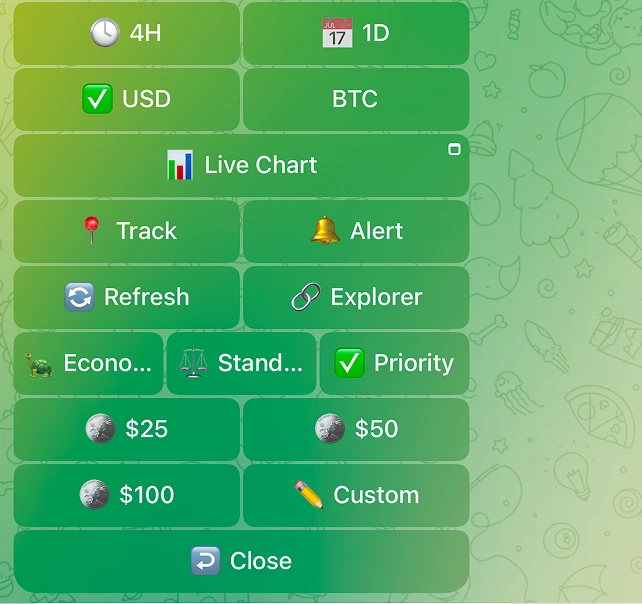
You buy from a token's card using the amount presets ($25 / $50 / $100, plus Custom). Open a card by pasting an AlkaneId or by opening a token you already hold, pick an amount, and confirm.
There is no separate "frBTC" versus "BTC" button to choose between. The presets fund the buy for you from whatever you are holding (see Smart funding below), so you just choose how much.
Smart funding: the bot handles frBTC for you
frBTC is the pool-native form of BTC that swaps settle in. You never wrap it by hand:
- If you already hold frBTC, the buy spends it directly, with no wrapping step and no wrap premium.
- If you are funding with BTC, the bot wraps what it needs into frBTC as part of the buy.
Either way, you only pick an amount. If you already hold frBTC (for example from selling a token), the buy spends it directly and skips the wrap. Otherwise the buy wraps the BTC it needs.
How a BTC-funded buy reaches the chain (the honest version)
When a buy wraps BTC, that does not happen in a single on-chain transaction. One wrap-and-swap transaction is not possible here because of the Alkanes fuel limit. Instead the buy rides as a CPFP transaction package: a wrap transaction (your BTC becomes frBTC) and a swap transaction (the frBTC buys your token, riding on top of the wrap), submitted so they confirm together. The bot says so in the preview:
This is sent as a 2 transaction package. We wrap your BTC to frBTC, then the swap rides on top once it confirms.
A buy paid purely from frBTC you already hold is a single swap and skips the package entirely.
Slippage and fee tiers
Two controls shape every buy. Both are always on.
Slippage
Your slippage tolerance is the most the price may move during the trade before the swap cancels itself instead of filling at a worse price. The default is 2%. It is applied as a minimum-output floor: if the pool would deliver less than your minimum, the swap reverts on-chain and your funds come back (see Revert protection below). You set it under Settings -> Slippage, with presets and a custom value.
Fee tier
You pick a Bitcoin network-fee tier for the buy. A higher tier buys confirmation priority, not literal speed: it raises your transaction's standing in the mempool so it tends to confirm sooner.
| Tier | Bot label | Rough ETA |
|---|---|---|
| Economy | Economy | ~1h |
| Standard | Standard | ~30m |
| Priority | Priority | next block |
You can set the tier on the card, on previews, and as a saved default under Settings -> Fee cap / Fees. A separate fee cap (default 50 sat/vB) is a hard ceiling: your trade never pays a network rate above it, which protects you when the mempool spikes.
The preview
Before you commit, the buy can show a preview so you see exactly what you are getting:
| Field | What it tells you |
|---|---|
| You pay / Spend | The amount leaving your wallet |
| Est. you receive | The estimated token amount out |
| Route | Direct pool, or a multi-hop path with the hop count |
| Price impact | How much your own trade moves the price |
| Est. fees / Network fee | The Bitcoin network fee for the trade |
| Slippage | Your tolerance, applied as the minimum-out floor |
| Est. time | The expected timing for this buy |
For a BTC-funded buy the preview also lists the frBTC premium and the 2-transaction package note.
The preview footer restates your settings, for example "Slippage 2% · Fee cap 50 sat/vB. Change these in Settings."
Confirmations the bot interposes
Regardless of the preview, some buys force a hard second confirmation before the bot signs. This is by design and always on.
| Trigger | What you see |
|---|---|
| High price impact | "This trade has <pct> price impact across <hops> hops (the swap fee is separate). Confirm anyway?" |
| Hard to exit | A warning that selling the token back would be costly or impossible, before you buy in. |
| Large trade | "This trade is <amount> BTC, above your large-trade threshold ... Confirm to proceed." |
These re-apply even on one-tap paths. They exist so a fat-finger or a thin pool cannot quietly cost you.
The live status stream
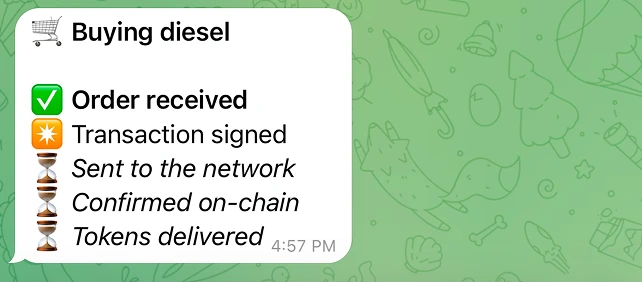
Once you confirm, the buy updates in place. You do not refresh anything. The status walks through:
| Step | Bot label |
|---|---|
| 1 | Order received |
| 2 | Transaction signed |
| 3 | Sent to the network |
| 4 | Confirmed on-chain |
| 5 | Tokens delivered |
While it works you see "Confirming on the network... this can take a few minutes. Sit tight, we will update this message." When it lands you get "Bought <amount> <symbol>!" with a View transaction link and an Open position button.
Revert protection: your funds are not lost
If the price moves past your slippage, the swap reverts on-chain instead of filling at a bad price. This is the most important safety in the bot, and it is always on, a property of how the swap transaction is built, not a setting.
- The swap is built so a reverted swap returns your frBTC to your wallet.
- The bot refuses to record a zero-delivery as a successful buy, so a revert can never show up as a "bought" that delivered nothing.
The bot's own message after a protective revert reads:
Buy cancelled to protect you. The price moved more than your slippage, so the swap reverted on-chain and the buy did not go through.
and reassures you:
Your frBTC is safe and waiting in your wallet. Only the on-chain network fees for the attempt were spent.
From there you can Retry (optionally after raising your slippage or lowering the amount), or open your wallet to manage the frBTC.
DIESEL mined on the buy
Every buy (and every normal swap) can also mine that block's DIESEL share straight into your own wallet, in the same transaction, 100% yours. The success card shows "DIESEL mined: <amount>" with the note "100% yours, in your wallet." It adds only a small amount to the network fee, it is on by default, and you can turn it off under Settings -> DIESEL Mining. Mining applies to buys and normal swaps, not sells.
Quick checklist
- Open a token's card, pick an amount preset (or Custom), review the quote, and Confirm.
- Funding is automatic: the bot spends your held frBTC, or wraps BTC for you when it needs to.
- A BTC-funded buy rides as a 2-transaction package (wrap + swap) that confirms together; check the Est. time line. A buy from held frBTC is a single, quicker swap.
- Set your slippage (default 2%) and fee tier (Economy / Standard / Priority); a higher tier buys priority, not literal speed.
- Watch the live status: Order received, Transaction signed, Sent, Confirmed on-chain, Tokens delivered.
- If a swap reverts, your frBTC comes back to your wallet automatically. Your funds are not lost.