Your positions
Read a live position card, pin it to track PnL, and share a branded PnL image.
When you buy a token through Alkanex, it becomes a position. The position card is where you read it: what you hold, what you paid, what it is worth now, and how much you are up or down. From the same card you sell, refresh, switch units, change the chart timeframe, and share your PnL as an image.
A position card looks like the token card, with one extra block on top: Your position. Everything below is grounded in what the bot actually shows today.
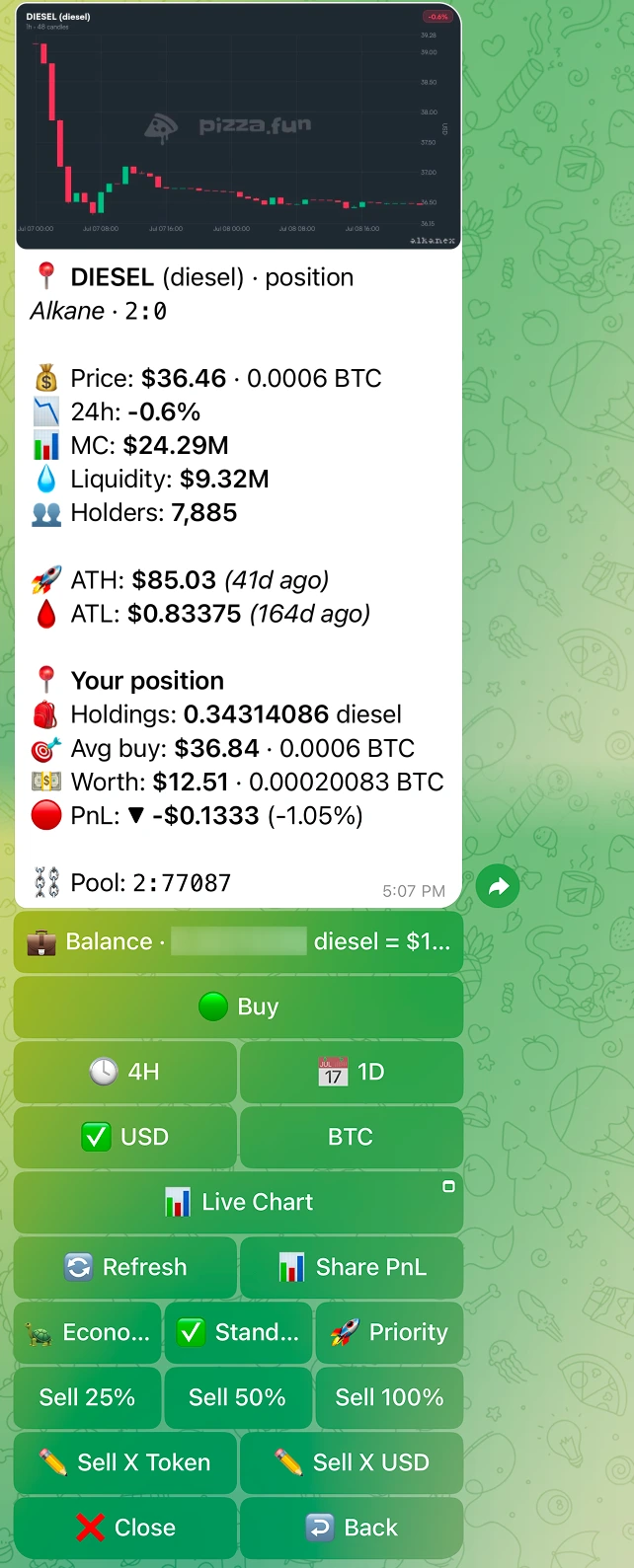
Opening a position card
You reach a position card two ways:
- From your Portfolio. Open Portfolio, then tap a holding row. Each row shows the token name and your signed PnL, and opens the live card.
- From a token card you already hold. If you hold the token, the card exposes a Sell button that flips to your position.
The Portfolio holdings list only shows tokens you bought through the bot, because those are the only ones with a cost basis (an entry price). A token you deposited but never bought has no entry price and no PnL, so it will not appear there.
Reading the position card
The Your position block is the heart of the card. Here is every field and what it means.
| Field | Label in the bot | What it tells you |
|---|---|---|
| Holdings | Holdings | How many of the token you hold right now. |
| Average buy | Avg buy | Your average entry price across the buys that built this position. |
| Current price | Now | The token's live price. |
| Worth | Worth | What your holdings are worth at the current price. |
| PnL | PnL | Your unrealised profit or loss on what you still hold, signed. |
| Realised PnL | Realised | Profit or loss you have already locked in by selling. |
| Market cap | Market cap | The token's live market cap. |
| Sell-all impact | Sell-all impact | The price impact of a 100% sell of this position. Shown when the bot can compute it. |
The money lines (price, average buy, worth, PnL) follow the active display unit. Toggle USD or BTC and these numbers re-render in that unit. The toggle is display-only, it does not change anything about your position.
When the price is not available
If the pool is temporarily unreadable, the card is honest about it instead of guessing:
| You see | What it means |
|---|---|
Live price updating, one moment. | The card is fetching a fresh price. Give it a moment, or tap Refresh. |
Price unavailable. No pool right now. | There is no readable pool to price the token against at this instant. |
Position closed. Fully sold. | You sold the whole position. There is nothing left to value. |
Card controls
The position card carries the same display controls as the token card, plus the sell grid.
| Control | What it does |
|---|---|
| USD / BTC toggle | Switches the unit for all money lines on the card. Display-only. |
| Timeframe | Changes the candle range on the chart photo. |
| Fee tier | Picks Economy, Standard, or Priority for a sell from this card. A higher tier buys confirmation priority, not literal speed. |
Refresh | Re-reads live price, market data, and your balance, then re-renders. |
Share PnL | Generates a branded PnL image (see below). |
Close | Closes the card. |
The sell buttons (Sell 25%, Sell 50%, Sell 100%, Sell X Token, Sell X value) live on this card too. Selling is covered on its own page.
Track: pin a live position card
Track pins the position card so it stays put and keeps itself current. Once pinned, the card auto-updates: the chart, the market block, and your PnL refresh in place, so you can watch a position move without re-opening it.
You start tracking from the token card's Track button, or from the post-trade Track this position action after a buy. A tracked card keeps all the same controls: refresh, timeframe, USD/BTC toggle, fee tier, and Share PnL.
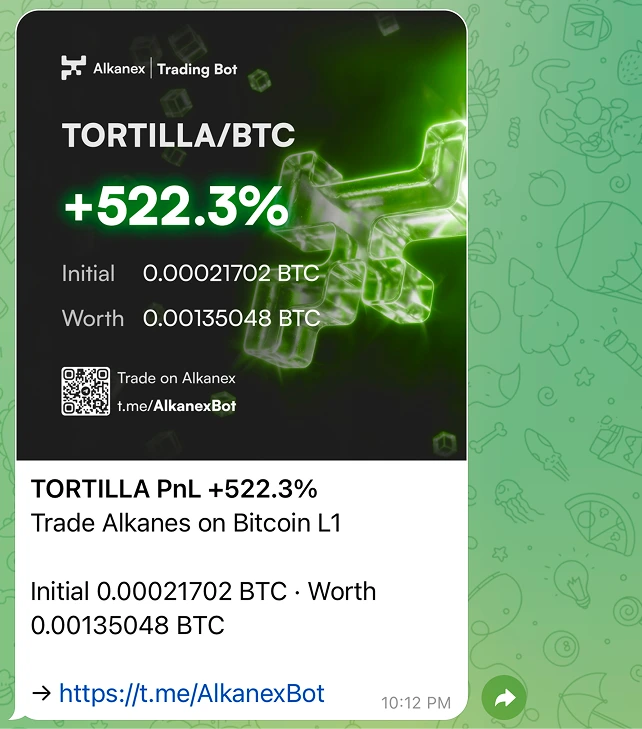
Share PnL
Share PnL turns your position into a branded image card you can post or send. The bot renders a high-resolution PnL image from the position's numbers and captions it:
{{symbol}} PnL on Alkanex. Trade alkanes on Bitcoin L1.
It is a snapshot of the position at the moment you tap it. Share it anywhere you would share a screenshot.
PnL, explained honestly
A few notes so the numbers are never a surprise.
- PnL is unrealised. It is the profit or loss on what you still hold, marked at the live price. It moves every time the price moves.
- Realised is locked in. It reflects what you already took out by selling. PnL and Realised are tracked separately so you can see both at a glance.
- Entry-based fields are cost-basis fields. Average buy, PnL, and Realised all come from the trades the bot recorded for you. Tokens you deposited rather than bought have no entry, so they carry no PnL.