Withdraw to an external wallet
Send native BTC (or frBTC) from your Alkanex wallet to any outside Bitcoin address, with real safety checks.
Withdraw sends funds out of your Alkanex wallet to an external Bitcoin address you control. It is a real send, not the in-wallet Convert to BTC: the money leaves the bot. Because it moves your funds off the platform, it has more friction than a trade by design, a typed address check and optional 2FA.
Two ways to send
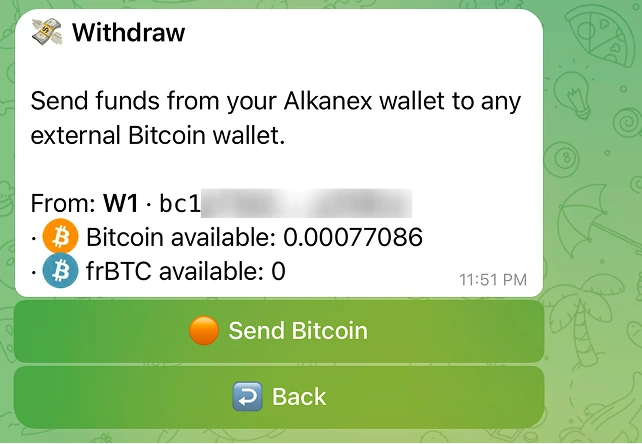
The Withdraw panel offers two routes. Its own words: "Send funds from your Alkanex wallet to any external Bitcoin wallet."
| Route | Button | What it sends | Who it is for |
|---|---|---|---|
| Route A | Send Bitcoin | Native BTC, a normal on-chain Bitcoin send | Everyone. This is the safe default. |
| Route B | Send frBTC (under Advanced) | frBTC, an Alkanes asset, by edict transfer | Advanced users sending to another Alkanes-aware wallet |
frBTC is not regular Bitcoin
It sends from the wallet you opened
Withdraw is scoped to the wallet card you open. The panel shows a From line naming that wallet (its label and address) so the source is explicit, and the confirm screen repeats it. If you keep several wallets, open the one you want to send from first. There is no hidden "active wallet" deciding where your money comes from.
The flow, step by step
- Open the wallet, then tap Withdraw and pick Send Bitcoin (or Advanced -> Send frBTC).
- Amount. Reply with a BTC amount (
0.001), sats (15000 sats), or a percent (50%), or tap a preset. A 100% send is a sweep: it empties the wallet, the network fee comes out of that amount, and your balance after is 0. A minimum withdraw applies, and if your balance is too small to sweep after the fee, the bot tells you the minimum instead of sending. Amounts above your balance are refused with a clear message. - Destination. Reply with the destination Bitcoin address. The bot validates it and refuses a test-network address, a Lightning invoice, or an unsupported type. For frBTC to a non-Taproot address, it shows an extra warning, because almost all Alkanes wallets use Taproot (
bc1p) and a non-Taproot wallet very likely cannot receive frBTC. - Confirm. A summary shows From, To, what you are sending (Bitcoin, or "frBTC, Alkanes asset"), the amount, the estimated network fee, and your balance after. It states plainly: "This cannot be undone. Bitcoin transactions are final."
- Type to confirm. A safety check asks you to reply with the last few characters of the destination address. A mismatch does not send.
- 2FA, if you enabled it. If you set up a PIN or an authenticator app (see Security and custody), the bot asks for it here before it signs.
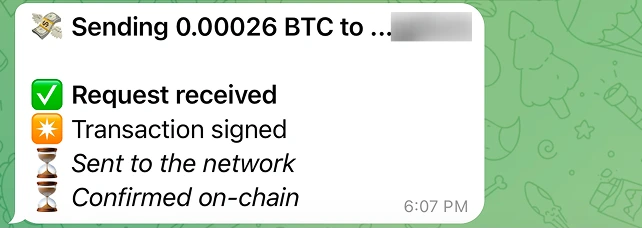
- Watch it send. An anchored checklist updates in place: Request received, Transaction signed, Sent to the network, Confirmed on-chain, Delivery verified. It gives you a View transaction link (mempool.space for Bitcoin; the espo trace plus mempool for frBTC).
How the fee is applied
For a 100% (Max) withdraw, the network fee is taken out of the amount, so the destination receives the amount minus the fee and your balance after is 0. For any specific amount you type, the fee is added on top from your remaining balance, and the destination receives the full amount you entered. The confirm card spells this out. The fee is estimated up front and capped, and the actual fee paid is checked against that estimate before signing.
Safety checks
Withdraw is deliberately more guarded than a trade:
| Check | What it does |
|---|---|
| Minimum withdraw | Tiny sends are refused, since the network fee would eat them. |
| Typed address confirm | You retype the last characters of the destination before it sends. |
| Optional 2FA | A PIN and/or authenticator code at the moment of approval, if you turned it on. |
| Mature inputs | Only well-confirmed coins are spent. |
If a withdraw does not complete
Related
- To turn frBTC into native BTC inside your own Alkanex wallet (not a send out), use Convert to BTC.
- To require a PIN or authenticator code on every withdraw, see Security and custody.