Selling
Sell any token you hold straight from its position card, in one tap, and choose how you get paid.
When you hold a token, selling is one tap away. You open its position card, choose how much to sell, and the bot quotes, builds, signs, and broadcasts the Bitcoin transaction for you. There is no wallet pop-up and no PSBT to sign by hand.
Selling spends tokens you already hold, so it does not need any BTC wrapping step and it works for any token you own. Live
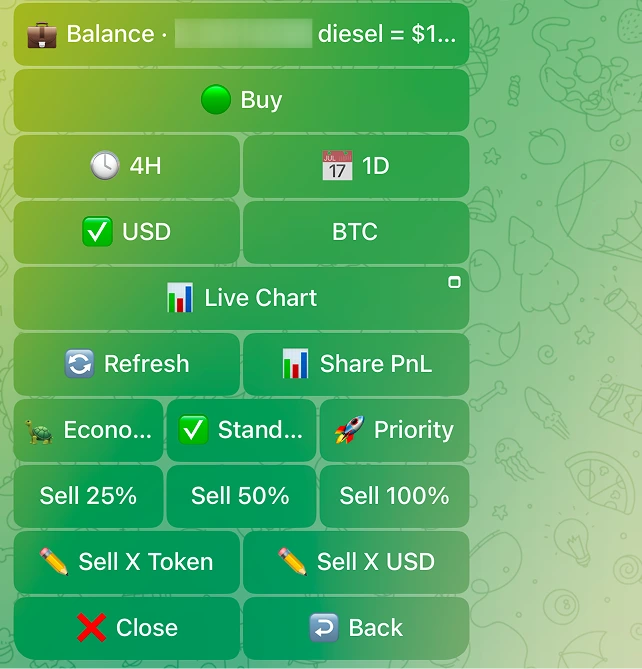
The sell grid
Every position card carries its own sell grid. From it you can sell a slice or your whole bag:
| Button | What it sells |
|---|---|
| Sell 25% | A quarter of your holdings |
| Sell 50% | Half of your holdings |
| Sell 100% | Your entire position |
| Sell X Token | A token quantity you type, for example 12.5, or a percent like 25% |
| Sell X value | A value you type in the active unit (USD or BTC), converted to tokens at the live price and capped at your balance |
The Sell X value button follows your USD/BTC display toggle. If the card is showing USD, you type a USD value. If it is showing BTC, you type a BTC value. The two custom buttons are separate on purpose, so the unit you are typing in is never ambiguous.
When you tap a custom button the bot asks for the amount. For Sell X Token the prompt reads:
Send the SELL amount. Examples:
25%,12.5(whole tokens), or raw atomic units.
One tap, or a preview first
By default, selling is one tap. With Sell Preview off (the default), tapping a sell amount fires the trade right away, with no preview step in between.
Turn Sell Preview on in Settings if you want a checkpoint. The bot describes it as:
When ON, tapping a Sell button shows a preview (route, price impact, fee, slippage) before you confirm. When OFF (default), tapping Sell executes right away. Large trades and high price-impact trades always ask for a confirmation either way.
The always-on confirmations cover:
| Trigger | When it fires |
|---|---|
| High price impact | Price impact exceeds your slippage setting |
| Large trade | Trade size is at or above the large-trade threshold |
| Hard to exit | The token has no clean route back to frBTC |
How you get paid
You choose what a sale pays out, under Settings -> Sell payout. The bot explains the choice like this:
Choose what you get when you sell. BTC lands in your wallet once the Subfrost federation releases it, usually 30-60 minutes after the sale, sometimes longer, for a small fee (usually a few hundred sats). frBTC is instant and ready to trade again, with no extra fee. Very small sells stay as frBTC. Default is BTC.
| Payout | Speed | Fee | Best for |
|---|---|---|---|
| Native BTC (default) | Usually 30 to 60 minutes (sometimes longer), released by the Subfrost federation | A small network fee, usually a few hundred sats | Taking profit back into plain Bitcoin |
| frBTC | Instant | No extra fee | Trading again right away |
Very small sells stay as frBTC regardless of your setting, because the network fee to release native BTC would not make sense on a tiny amount.
Auto-convert on sell
When your payout is set to native BTC, the bot is wired to auto-unwrap the frBTC proceeds of a sale into native Bitcoin for you, so you do not have to run a separate convert. frBTC payout is the opt-out for this in Settings.
Watching a sell go through
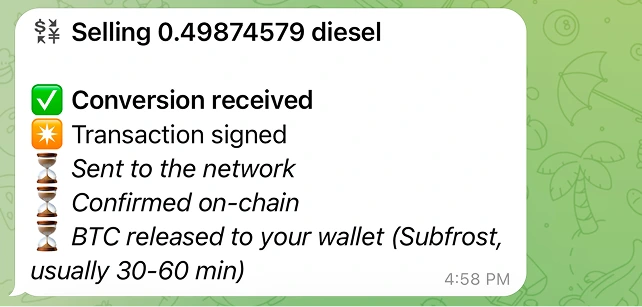
After you fire a sell, the card updates in place with a live status checklist. You see the same five steps every time:
| Step | Bot wording |
|---|---|
| 1 | Order received |
| 2 | Transaction signed |
| 3 | Sent to the network |
| 4 | Confirmed on-chain |
| 5 | Swap confirmed |
While it runs, the header reads Selling {symbol}. When it lands, the header flips to the result:
Sold {amount} {symbol} for {btc} BTC
with a link to the explorer. The success line is plain and exact: it tells you the token amount you sold and the BTC you received.
A native-BTC sale happens in two on-chain steps, so the card gives you two links to follow: View sale (the swap that sold your tokens) and View BTC payout (the frBTC to BTC release that lands the Bitcoin in your wallet). A sale paid out as frBTC shows a single View transaction link, because there is no separate payout step.
What is safe to assume
- Selling never wraps BTC. It spends tokens you hold, so no funding step is ever required on a position you own. (If a token has no route back to frBTC, the card flags it instead of selling; see below.) Live
- The sell grid (25% / 50% / 100% / Sell X Token / Sell X value) and one-tap execution with Sell Preview off are live. Live
- Large and high price-impact sells always confirm first. This gate is unconditional. Live
- Native BTC payout via auto-convert-on-sell is validated on mainnet. It settles over the Bitcoin network, so allow minutes, occasionally up to about an hour. Live