Settings
Every toggle in Alkanex, what it does, and its default, so you trade the way you want.
Settings is where you tune how Alkanex behaves: how amounts are shown, how much price movement and network fee you tolerate, whether you see a preview before each sell, what you get paid in, and your language. Everything persists to your account and applies to the next render. Open it from the main menu with the Settings button.
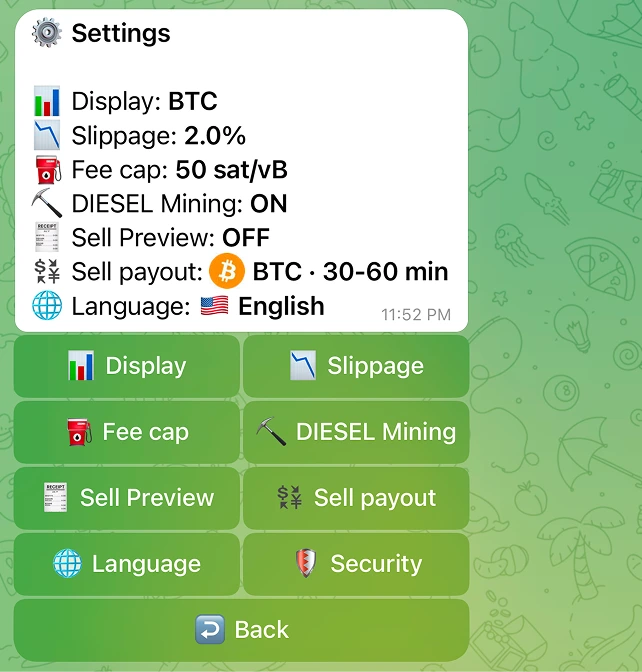
The settings at a glance
Each row shows its current value and opens a sub-panel when you tap it. Defaults below are what a fresh account starts with.
| Setting | What it controls | Default |
|---|---|---|
| Display | Whether amounts show in BTC or sats | BTC |
| Slippage | Max price movement allowed during a trade | 2% |
| Fee cap | Ceiling on the Bitcoin network fee rate, in sat/vB | 50 sat/vB |
| DIESEL Mining | Whether a buy or normal swap also mines DIESEL to your wallet | ON (see note) |
| Sell Preview | Whether a sell shows a preview before it fires | OFF |
| Sell payout | What you receive when you sell: native BTC or frBTC | BTC |
| Security | Optional PIN / authenticator for withdrawals and seed reveal | Off |
| Language | Bot language | English or 中文, auto-detected |
Several of these settings are always on and unconditional, but a few have real preconditions, called out in their sections below: DIESEL Mining (needs the operator master switched on) and the native-BTC Sell payout (its auto-unwrap step settles over the Bitcoin network, usually 30 to 60 minutes). Read the note in each before relying on it.
Display unit
Choose how Alkanex shows amounts: BTC or sats. The sub-panel reads "Choose how amounts are shown." This is a display preference only. It does not change anything about your trades, your balances, or which value unit a custom input expects.
Default is BTC.
Slippage tolerance
Slippage is the maximum price movement you allow between quoting a trade and it landing on-chain. The sub-panel reads "Max price movement allowed during a trade." You pick from presets or tap Custom to set your own.
Default is 2%.
Your slippage is applied as the minimum output of the swap. If the pool would give you less than that minimum, the swap reverts on-chain rather than fill at a worse price, and your frBTC is returned to your wallet. That protection is always on. Live
Slippage and the protection gate
Fee cap and live network fees
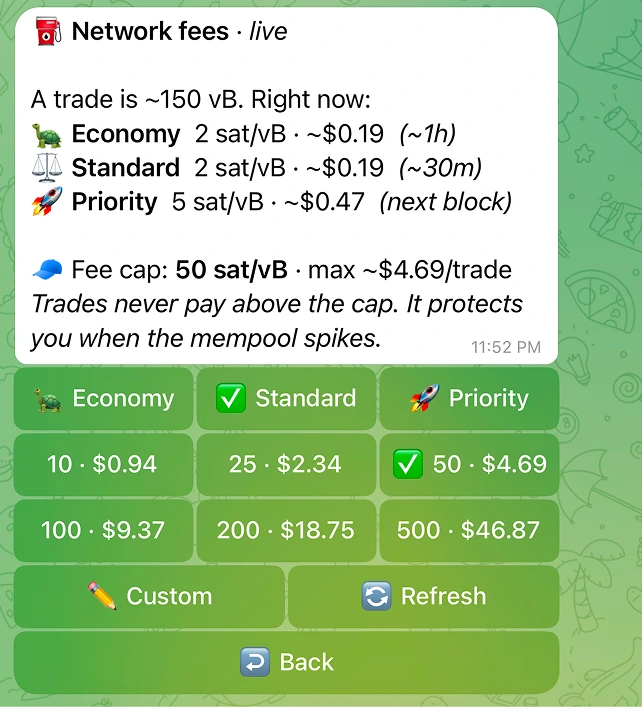
The fee cap is the ceiling on the Bitcoin network fee rate, in sat/vB. The sub-panel reads "Maximum BTC network fee rate before warning." Presets plus Custom.
Default is 50 sat/vB.
Your trades never pay above the cap. It protects you when the mempool spikes: if fees rise past your ceiling, the bot holds rather than overpay. The fee cap panel shows it as a per-trade USD ceiling ("max ~$X per trade"). Live
The live network-fees view
The same panel shows live Bitcoin mempool fees so you can set the cap with real numbers in front of you. A trade is roughly a known number of virtual bytes, and the panel quotes each tier in sat/vB plus USD plus a rough ETA:
| Tier | Bot label | Rough ETA |
|---|---|---|
| Economy | Economy | ~1h |
| Standard | Standard | ~30m |
| Priority | Priority | next block |
A higher tier buys confirmation priority, not literal speed. The ETAs are estimates from current mempool conditions, not guarantees. If the live feed is briefly unavailable, the panel says so and offers Refresh. Live
DIESEL mining
With this toggle on and the operator master enabled (see the note below), a buy or a normal swap also mines DIESEL into your own wallet in the same transaction. It is 100% yours, in your wallet, and it adds only a small amount to the network fee. Mining applies to buys and normal swaps, not sells.
Default is ON.
This toggle only takes effect when the operator master is on
Operator-gated When a buy or swap does mine DIESEL, the success card shows "DIESEL mined" and notes "100% yours, in your wallet." You can turn it off here any time.
Sell preview
Sell Preview controls whether a sell shows a preview before it fires. The sub-panel reads: "When ON, tapping a Sell button shows a preview (route, price impact, fee, slippage) before you confirm. When OFF (default), tapping Sell executes right away."
Default is OFF.
With preview off, tapping a sell amount on your position card executes in one tap. Turn it on if you want to see the route and price impact before every sell.
Large and high-impact sells always confirm
Sell payout
Sell payout chooses what you receive when you sell: native BTC or frBTC. The sub-panel reads: "BTC lands in your wallet once the Subfrost federation releases it, usually 30-60 minutes after the sale, sometimes longer, for a small fee (usually a few hundred sats). frBTC is instant and ready to trade again, with no extra fee. Very small sells stay as frBTC. Default is BTC."
| Option | Bot label | What you get |
|---|---|---|
| BTC | "BTC · 30-60 min" | Native Bitcoin in your wallet, usually 30-60 minutes later (sometimes longer), small network fee |
| frBTC | "frBTC · instant" | Instant, ready to trade again, no extra fee |
Default is BTC. Very small sells stay as frBTC regardless.
The native-BTC payout depends on an auto-unwrap step
Live The auto-convert-on-sell path is validated on mainnet and the BTC default is shipped. If your proceeds are taking longer than expected, you can switch the payout to frBTC for an instant result.
Security (optional 2FA)
By default trading is one tap and needs no extra step. If you want more protection on the money-out paths, open Security and turn on a second factor. The panel's note: "Extra protection for withdrawals and seed reveal. Trading stays one tap."
You can enable either or both:
| Factor | How it works |
|---|---|
| PIN | A 6 to 10 digit PIN you enter on an inline keypad. Too-simple PINs are rejected, and repeated wrong entries trigger a temporary lockout. |
| Authenticator app | A standard TOTP code (Google Authenticator, Aegis, 1Password). The setup key is shown once and that message auto-deletes in 60 seconds. Codes are single use. |
When a factor is on, the bot asks for it at two moments: approving a withdrawal and revealing your recovery phrase. Trading is unaffected.
Losing a factor is deliberately slow
Default is Off for both. See Security and custody for the full custody picture. Live
Language
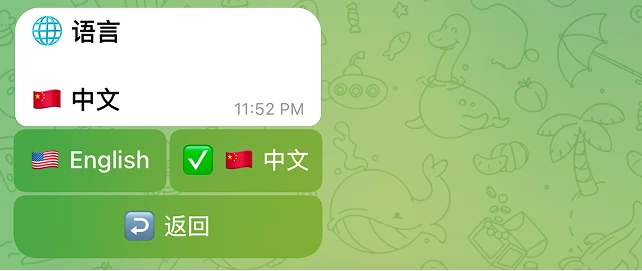
Switch the bot language between English and 中文. On first contact, Alkanex seeds your language from your Telegram language setting (a Chinese locale maps to 中文, otherwise English), and you can change it here any time. The next render uses the new language.
Default is auto-detected from Telegram.
Live