FAQ and common messages
What the bot's most common error and info messages mean, and exactly what to do about each one.
Alkanex tells you the truth on-chain. When a trade cannot go through, the bot says so in plain language and, where it can, refunds you. This page takes the real messages you may see and explains what each one means and what to do next. Every heading quotes the bot's actual wording.
The token will not trade
"No AMM pool yet. Token is not tradeable here."
There is no liquidity pool for this token, so there is nothing to trade against. The token card shows a no pool badge and no buy entry.
What to do: nothing you can fix from the bot. A pool has to exist before anyone can trade the token. Refresh the card later to see if one appears.
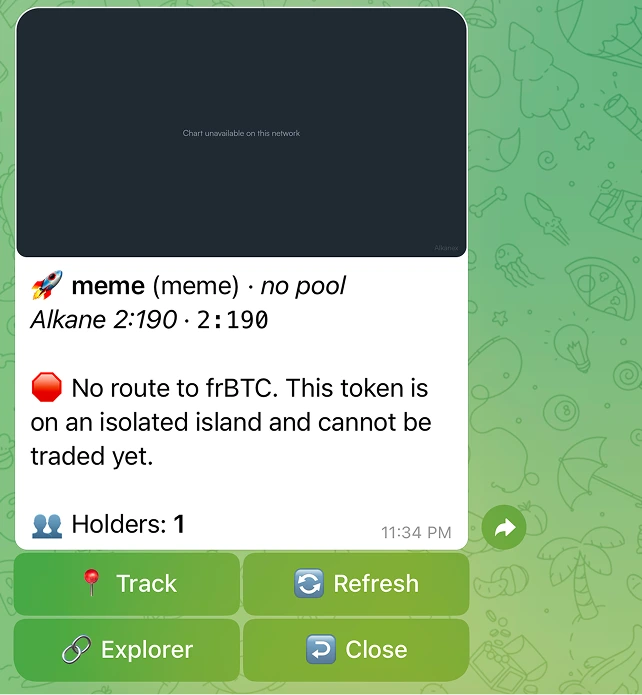
"No route to frBTC. This token is on an isolated island and cannot be traded yet."
The token has a pool, but the bot cannot find any path of pools that connects it back to frBTC, the wrapped BTC that pools price in. Without a route to frBTC, there is no way to price or settle the trade.
What to do: wait for a pool that bridges this token to a routable one. The bot routes through other pools automatically when a path exists (up to a few hops), so once liquidity connects the token, trading opens on its own.
The buy did not go through
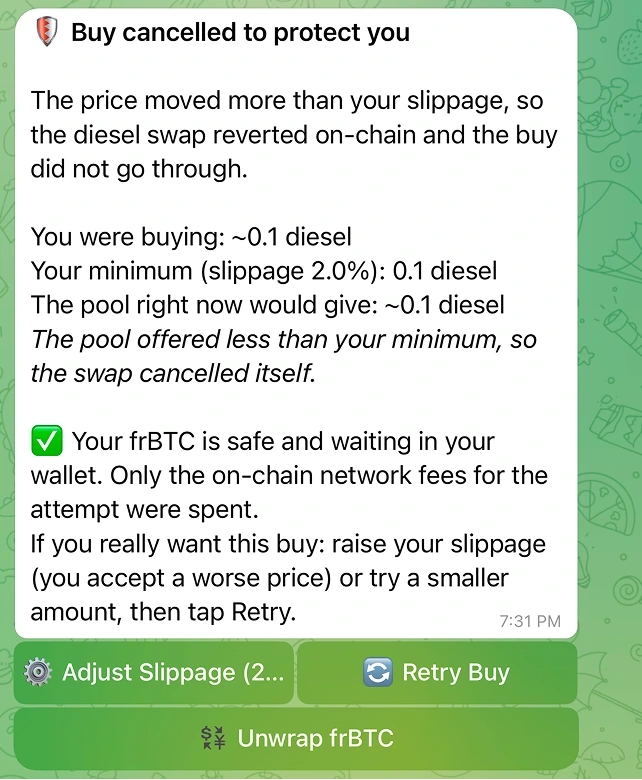
"Buy cancelled to protect you"
This is the slippage guard doing its job. The price moved more than your slippage tolerance between quote and execution, so the swap reverted on-chain and the buy did not happen. When your operator has the reassuring panel enabled, the bot shows you the full picture: what you were buying, your minimum after slippage, and what the pool would give right now.
In that case the panel ends with: "Your frBTC is safe and waiting in your wallet. Only the on-chain network fees for the attempt were spent."
What to do: tap Retry with a higher slippage (you accept a worse price), or try a smaller amount. The bot spells out the choice: "raise your slippage (you accept a worse price) or try a smaller amount, then tap Retry."
"Slippage exceeded. The price moved against you."
A shorter form of the same situation: the price moved against you past your tolerance. "Try again or raise tolerance."
What to do: retry, raise slippage in Settings, or use a smaller size.
"The swap reverted on-chain. No tokens were delivered and your frBTC was refunded to your wallet."
The swap failed on-chain for a reason other than slippage (for example the pool state changed mid-flight). The result is the same as any revert: no tokens, and your frBTC is back in your wallet.
What to do: try again. If it keeps reverting, the pool may be too thin for your size. Try a smaller amount.
"Pre-broadcast simulate reverted. The pool may have moved."
Before broadcasting, the bot simulates the trade. This message means the simulation failed, usually because the pool moved since the quote. Nothing was sent.
What to do: refresh the card and try again with a current quote.
Funding and balance messages
"Not enough spendable BTC"
This is the one-UTXO explanation, and it surprises people, so read it carefully. The bot quotes the wording directly:
A buy spends one BTC piece (UTXO). Pieces that hold your tokens are protected and never spent as BTC, so they do not count.
Bitcoin holds your balance in separate pieces called UTXOs. A self-funded buy has to be paid from a single plain-BTC piece. If your BTC is split across several small pieces, or sits bundled with tokens, no single spendable piece is large enough, even though your total looks fine.
The message tells you exactly what it needs and what you have: "This buy needs X BTC in one spendable piece. Your largest spendable piece is Y BTC." It then suggests a workable size: "Try Z BTC or less, or deposit more BTC to your wallet."
What to do: buy at or under the suggested amount, or tap Deposit BTC and add a single larger deposit, which lands as one fresh spendable piece.
"Not enough frBTC. Deposit or wrap more."
Your frBTC balance does not cover the buy. frBTC is the tradeable, pool-native form of BTC.
What to do: deposit BTC (it stays BTC) and buy; the bot wraps what the trade needs. Or sell a token to get frBTC. Wrapping is not instant: it waits for your deposit to confirm on Bitcoin and then settles as part of a separate transaction, so expect a few minutes, gated on Bitcoin block times.
"Not enough BTC. You have X. Pick a smaller amount or deposit more."
The amount you picked is more than your spendable BTC for this buy.
What to do: pick a smaller amount or deposit more.
"Amount too small. Try a bit more frBTC." / "That trade is below the minimum size. Try a slightly larger amount."
Trades have a minimum size of about 1,500 sats. Smaller amounts are not accepted.
What to do: increase the amount to at least the minimum.
"Your balance sits in a UTXO that holds more than one alkane. Wait for the DIESEL dust to settle, then try again."
This is the DIESEL dust case. The tokens you want to sell are sitting in the same Bitcoin piece (UTXO) as another alkane, often a little freshly mined DIESEL. The bot will not spend a piece that mixes more than one alkane, because that could move the wrong thing.
What to do: wait. The mixed piece resolves on its own as the dust settles into its own output over the next blocks, then sell again.
Bridge messages
"I don't have any Bitcoin. Can I still start?"
Yes. Tap 🌉 Bridge and fund from another network: ETH, USDC, USDT, SOL, BNB or TRX, from Base, Arbitrum, Ethereum, Solana, Tron or BSC. Native Bitcoin lands in your wallet and is credited like any other deposit. See Bridge to Bitcoin.
"No route is available right now. Try again in a moment, or pick another asset."
The bridge did not return a usable route for that pair at that moment. Wait a few seconds and try again, or pick another asset or network. It does not mean the pair is unsupported.
"The route minimum is X" / "The route maximum is X"
Each route has its own size band, set by the bridge. The message tells you the exact number for the asset you picked. Enter an amount inside the band.
"That amount is above what the bridge accepts. Enter a smaller one."
The amount is past the bridge's own ceiling, so no route is quoted for it. Enter a smaller amount. Retrying the same number will give the same answer.
"The bridge is handling other orders right now. Your quote is still on screen, tap again in a minute."
The bridge takes a limited number of orders per minute across everyone using it. Your quote stays on screen and nothing was created, so tap the same button again in a minute.
"Bridging is not available at the moment. Nothing was created and nothing was charged. Please try again later."
The bridge is not accepting new orders for a longer stretch. Nothing was created and nothing was charged. Come back later and start again. Orders already in progress are not affected and keep going.
"This is taking longer than usual. Your order is still open with the bridge."
The order passed the expected window. It has not failed and it is still open. The card adds a support button so you can reach Houdini with your Order ID.
Timing and in-flight messages
"Tx not confirmed in time. Check the explorer."
The bot waited for your transaction to confirm and hit its window without seeing a confirmation. This does not mean the trade failed. It means the bot stopped actively watching.
What to do: open the explorer from the trade and check the transaction's status directly. Bitcoin confirmation times depend on the mempool and the fee rate you set. A higher fee tier buys confirmation priority, not literal speed.
"Your previous trade is still going through. Hang tight until it settles, then you can place the next one. No new trade was started."
You tried to start a trade while a previous one for you was still in flight. The bot runs one trade at a time per user, so it blocked the new one before anything moved.
What to do: wait for the current trade to settle, then place the next. The key reassurance is in the message itself: "No new trade was started." Nothing was double-spent or duplicated.
Fee and broadcast messages
"Fee cap too low. Raise it in Settings."
Your network-fee cap is below what the current mempool requires to get the transaction relayed. The cap exists to protect you from overpaying when fees spike, so the bot refuses to silently blow past it.
What to do: open Settings -> Fee cap and raise it, or wait for the mempool to calm down. The default cap is 50 sat/vB. The Fees panel shows the live network rate so you can set a cap above it.
"Broadcast rejected by the network. Try again."
The transaction was built and signed, but a Bitcoin node rejected it when the bot tried to send it. This is usually transient (mempool state, a spent input, a brief node issue).
What to do: tap retry. If it persists, refresh the card so the bot rebuilds against current state and try once more.
"This conversion expired. Open it again from your wallet." / "This preview expired."
Quotes and previews are time-limited so you never trade on a stale price. After a while they expire and you reopen them.
What to do: open the action again from the wallet or token card to get a fresh quote.
Less common messages
| Message | What it means | What to do |
|---|---|---|
| "Could not load funding UTXOs. Please try again." | The bot could not read your spendable pieces this time. | Retry. It is usually a transient read. |
| "Quote failed. Try again." | The pricing request did not come back. | Refresh the card and retry. |
| "Trade service offline." | The trading service was briefly unavailable. | Wait a moment and try again. |
| "Wallet decryption failed. Contact support." | The bot could not unseal your wallet to sign. | Do not retry blindly. Contact support. |
| "Server misconfigured. Master key missing." | An operator-side key is not loaded; the bot refuses to sign rather than guess. | Wait and retry later. This is on the operator, not you. |
| "Could not verify your deposit address. Do not deposit. Contact support." | The bot could not re-verify your deposit address against its allowlist and fails closed. | Do not send funds to it. Contact support. |
Quick reference
| You see | The short version |
|---|---|
| No AMM pool yet / No route to frBTC | The token cannot be traded yet. Nothing you can fix. |
| Buy cancelled to protect you | Slippage guard fired. Your frBTC is safe. Retry with higher slippage or a smaller size. |
| Not enough spendable BTC | Your BTC is split across pieces. Buy a suggested smaller amount, or deposit one larger piece. |
| Not enough frBTC | Deposit BTC (it stays BTC) and buy; the bot wraps what the trade needs. Or sell a token for frBTC. |
| Balance sits in a UTXO with more than one alkane | DIESEL dust. Wait for it to settle, then retry. |
| Tx not confirmed in time | Still pending, not failed. Check the explorer. |
| Previous trade is still going through | One trade at a time. Wait for it to settle. No new trade was started. |
| Fee cap too low | Raise the cap in Settings, or wait for fees to drop. |
| Broadcast rejected by the network | Usually transient. Retry. |