Funding your wallet
Deposit BTC to your wallet. It stays as BTC and is used when you buy. Understand the honest timing, the silent-ignore rules, and where frBTC is held.
To trade, your wallet needs funds. You fund it by sending BTC to your deposit address. It is credited to your wallet and stays as BTC, used directly when you buy. There is no bridging step on deposit: the bot wraps exactly what a trade needs at buy time. This page covers the deposit screen, the real timing (it is not instant), and what the bot quietly ignores.
Your deposit address
From your Portfolio / balance panel, tap Deposit. The wallet card itself shows the address as tap-to-copy text plus a QR button, but the full Deposit screen opens from Portfolio. The deposit screen shows your taproot (bc1p) address as tap-to-copy text and as a QR code, so you can scan it from another wallet or paste it.
The bot re-verifies the address before every render and fails closed. If something is wrong it will not show you an address to send to, you will see instead:
Could not verify your deposit address. Do not deposit. Contact support.
If you see that message, do not deposit until it clears.
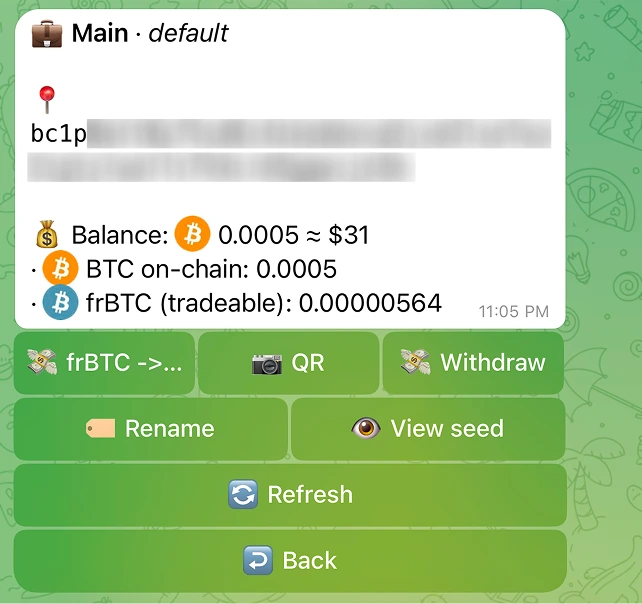
| Control | What it does |
|---|---|
| Address (tap to copy) | Copies your bc1p deposit address |
| QR | Shows the address as a scannable QR code |
| Refresh | Re-checks the address and refreshes the recent-deposits list |
| Back | Returns to the wallet card |
Your deposit stays as BTC
A deposit stays as BTC in your wallet. There is no auto-convert, no split, and no bridging step on deposit. Your BTC is credited and then used directly when you buy: the bot wraps exactly what a trade needs at buy time. The deposit screen says so plainly:
Send BTC to this address. It is credited to your wallet and used directly when you buy. No bridging step.
Honest timing: this is not instant
Crediting is gated on Bitcoin, so it takes minutes, not seconds. Here is exactly why, step by step.
- A separate background watcher notices your deposit in the mempool, roughly every 15 to 60 seconds.
- It credits your deposit only after it gets 1 Bitcoin confirmation, which averages about 10 minutes.
So a realistic end-to-end time is "minutes, gated on Bitcoin block times". The deposit waits for a block before it is credited.
What the bot silently ignores
Some deposits will never be credited and will never trigger a notification. There is no error, the bot simply does nothing. Check this list first if a deposit seems to vanish.
| Ignored deposit | Why |
|---|---|
| Under 10,000 sats (dust) | Below the minimum deposit. Too small to be worth crediting. |
| A transfer between your own bot wallets | Self-transfers are skipped. |
| Wrong network | The watcher only tracks addresses whose prefix matches its network (mainnet bc1). |
Deposit states and notifications
A processed deposit moves through these states. The bot sends you a notification as it advances.
| State | Label you see | What it means | Notification |
|---|---|---|---|
| Detected | in mempool | The watcher saw your deposit, awaiting confirmation | "Deposit detected: <amount> BTC ... Awaiting confirmation." |
| Confirmed | confirmed | Your deposit got 1 Bitcoin confirmation and is credited as BTC | "Deposit confirmed at block <height> ..." |
The deposit screen also shows a Recent Deposits list so you can see what is in flight. If you have not deposited yet it reads "No deposits yet."
Where frBTC is held
Your deposit stays as BTC, so nothing is wrapped when you fund. Wrapping happens later, at buy time, and only for the amount a trade needs. When BTC is wrapped, the resulting frBTC is not held by the bot. It is held by the subfrost FROST federation, and the bot verifies the pinned signer on every wrap:
Wrapped BTC (frBTC) is held by the subfrost FROST federation, not by this bot. Pinned signer verified on every wrap.
Quick checklist
- From your Portfolio / balance panel, tap Deposit to get your address and QR.
- Send at least 10,000 sats, or the deposit is silently ignored.
- Expect minutes, not seconds: your BTC is credited after 1 Bitcoin confirmation.
- Your deposit stays as BTC. The bot wraps only what a trade needs, at buy time.
- Watch the state move from in mempool to confirmed.