Security and custody
How Alkanex holds your keys, why it can trade in one tap, and the one thing only you can do, back up your recovery phrase.
Alkanex is custodial by default. The bot creates a Bitcoin wallet for you and signs your trades, which is what makes the whole experience one tap. This page explains exactly what that means, what stays your responsibility, and how to reveal and protect your recovery phrase safely.
Read it once. The most important takeaway is simple: back up your recovery phrase early, because nobody, including the operator, can recover it for you.
Custodial by default, in plain language
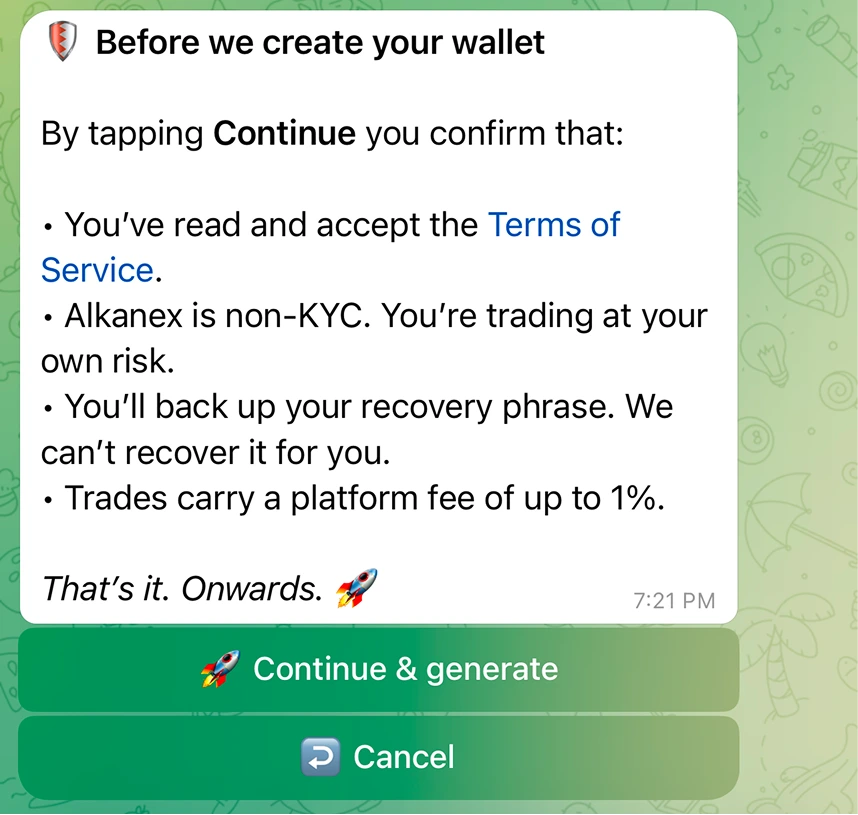
When you accept the terms and tap Generate, the bot creates a Bitcoin wallet for you on the spot. There is no seed phrase to handle before your first trade, and no browser pop-up to sign anything. The bot quotes the trade, builds the Bitcoin transaction, signs it, and broadcasts it.
That convenience exists because the bot holds the signing key for your wallet. Here is the full chain:
| Step | What happens |
|---|---|
| You generate a wallet | A BIP86 taproot Bitcoin wallet is created and set as your default wallet. |
| Your recovery phrase is sealed | The mnemonic is encrypted before it ever touches storage (see envelope encryption below). |
| You trade by tapping | The bot decrypts in memory, signs the transaction, and broadcasts it. There is no user signing step. |
| You can reveal the phrase any time | View seed decrypts it on demand and shows it to you (see below). |
Because the key is custodial, you do not connect an external wallet and you do not approve transactions in a pop-up. You set your limits in Settings (slippage, fee cap), and the bot signs within them.
Envelope encryption
Your recovery phrase is never stored in the clear. It is protected with envelope encryption, a standard two-layer pattern:
- The mnemonic is encrypted with a random per-wallet key.
- That per-wallet key is itself encrypted under a master key held by the operator, separate from the database.
The phrase is decrypted only in memory, only at the moment it is needed, to sign a trade you asked for or to show you the phrase when you tap View seed. The encryption is versioned so the master key can be rotated without re-encrypting your underlying phrase.
Non-KYC, and you trade at your own risk
Alkanex does not ask for your name, email, phone, or any identity document. The only identity is your Telegram user id, and a wallet is gated solely by a terms confirmation. The bot states this plainly before it creates your wallet:
Alkanex is non-KYC. You're trading at your own risk.
No identity check also means no account recovery desk. There is no "forgot password" and no support agent who can restore access to your funds. Your recovery phrase is the only key. This is the trade-off you accept for a permissionless, tap-to-trade experience.
Non-KYC No account and no identity check. Wallet gated only by a terms tap.
Your responsibility: back up the phrase
This is the one thing the bot cannot do for you. The operator holds the encrypted phrase to sign your trades, but the operator cannot recover or reset it on your behalf, and there is no backdoor that returns your funds if you lose access to your Telegram account. The terms say it directly:
You'll back up your recovery phrase. We can't recover it for you.
Right after a wallet is created, the bot reminds you:
Important: backup your recovery phrase NOW. Anyone with the phrase controls this wallet.
You are not forced to back up before you trade. You can tap "I'll do it later" and start using the wallet immediately. That is a convenience, not a recommendation. Reveal and back up your phrase early, ideally before you fund the wallet with anything you would mind losing.
Back it up before you fund it
Revealing your recovery phrase safely
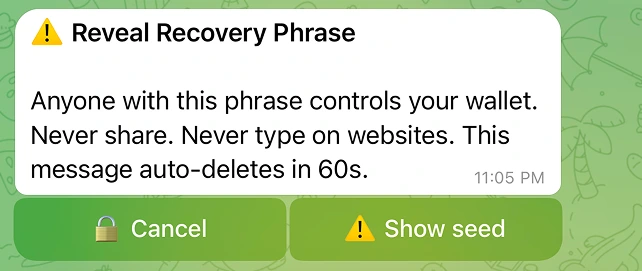
Open the wallet card and tap View seed. After a confirmation, the bot decrypts your phrase and shows it in a single message. The reveal screen carries this warning:
Anyone with this phrase controls your wallet. Never share. Never type on websites. This message auto-deletes in 60s.
A few rules keep the reveal safe:
| Safety behavior | What it means for you |
|---|---|
| Auto-delete after 60 seconds | The message removes itself, so the phrase does not linger in your chat history. Write it down before it disappears. |
| Never type it on websites | No legitimate site or "wallet connect" page ever needs your Alkanex recovery phrase. Anyone asking for it is trying to steal your funds. |
| Decrypt on demand only | The phrase is decrypted only when you ask to see it, then dropped from memory. |
| Refused while signing is frozen | If signing is temporarily paused for maintenance, the reveal is refused with a "your funds are safe" message rather than half-completing. |
Phishing is the real threat
Optional 2FA: PIN and authenticator
Trading stays one tap and needs no second factor. But the money-out paths, a withdrawal and a recovery-phrase reveal, can be locked behind an extra check that you turn on yourself in Settings -> Security. The panel's own words: "Extra protection for withdrawals and seed reveal. Trading stays one tap."
| Factor | How it works | Notes |
|---|---|---|
| PIN | A 6 to 10 digit PIN on an inline keypad | Too-simple PINs are rejected; repeated wrong entries trigger a temporary lockout |
| Authenticator app | A TOTP code from Google Authenticator, Aegis, or 1Password | The setup key shows once and auto-deletes in 60 seconds; each code is single use |
You can enable either or both. When a factor is on, the bot asks for it right before it signs a withdrawal, and again before it reveals your recovery phrase. Nothing else in trading changes.
Recovering a lost factor is deliberately slow
Both factors are off by default. Turning one on is a good idea once you hold a balance you would mind losing.
Where your wrapped BTC actually sits
Deposited BTC stays as BTC in your bot-custodied wallet. When you buy, the bot wraps exactly what the trade needs into frBTC. frBTC itself is held by the subfrost FROST federation, not by the bot. The bot verifies the pinned signer on every wrap. In other words, custody of your spendable balance is split between the encrypted Bitcoin key the bot holds for you and the federation that backs frBTC.
Want full self-custody?
The honest answer today: Alkanex is custodial only. Every wallet the bot creates is a managed-custody wallet, and only the bot signs.
A non-custodial mode, where you connect and sign with your own wallet, is a possible future direction, not a feature you can use now. It has no button, no setting, and no surface anywhere in the bot today, so we will not present it as "coming soon." There is no date, no roadmap commitment, and nothing to enable.
Connect-your-own-wallet is not built. It is mentioned here only as a possible future direction, with no in-product surface today.
In the meantime, you have two ways to move funds out of the custodial model. You can Withdraw to an external Bitcoin address you control (see the Withdraw page), or you can reveal your recovery phrase and import it into a wallet you control. The phrase is yours the moment you reveal it.
If you only want to get back to native Bitcoin without leaving the bot, use Convert to BTC ("frBTC -> BTC") on the wallet card. This unwraps your frBTC back to native BTC, which arrives in the same bot-custodied wallet once the Subfrost federation releases it, usually 30 to 60 minutes later. It is an in-wallet conversion, not a send to an outside address, so the funds stay under custodial signing until you withdraw or import your phrase elsewhere.
The short version