Portfolio
Your total balance, your Bitcoin, and your open positions in one panel, with each holding one tap from its live card.
The Portfolio is your at-a-glance net worth inside Alkanex. It shows what you hold in Bitcoin, what you hold in tradeable frBTC, anything still on its way in, and every position you have bought through the bot. Each holding opens its live card so you can manage it without leaving the panel.
Open it from the main menu by tapping Portfolio, or send /start and pick Portfolio. The header reads Your Balance.
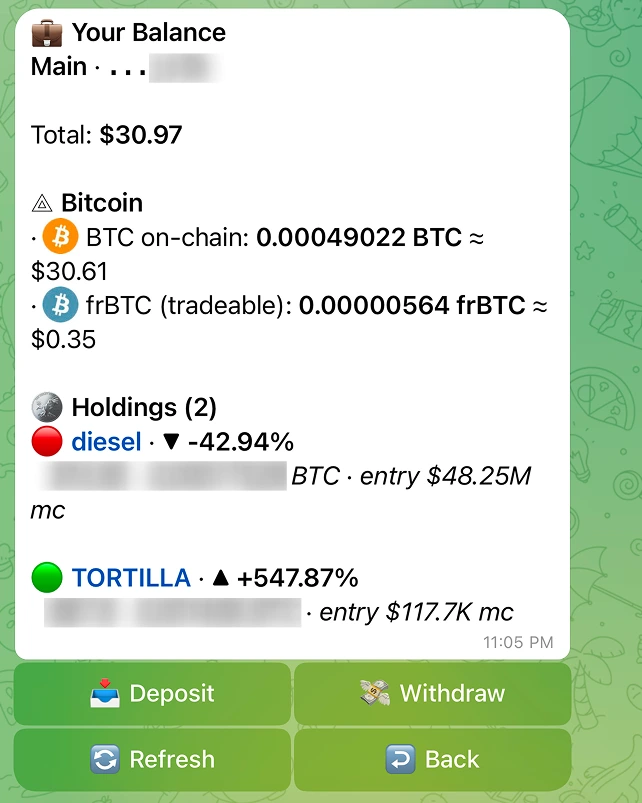
What the panel shows
The panel is built in three parts: a Total, a Bitcoin section, and a Holdings list.
Total
The first line after the wallet label is your Total in USD. It adds your on-chain BTC and your frBTC at the current Bitcoin price. Until either the price feed or your on-chain balance has returned, you see "Loading..." instead of a number; once one of them resolves, the panel shows the real figure, and a freshly funded wallet can legitimately read $0.
Bitcoin section
| Line | What it is |
|---|---|
| BTC | Your spendable Bitcoin at the wallet address. This is what pays network fees and funds buys. Shown in your display unit (BTC or sats) with a rough USD value. |
| frBTC | The wrapped, pool-native form of BTC that swaps trade in. This line appears only when you actually hold some, so a normal view is not cluttered with a "frBTC: 0" line. |
| Pending deposits | A "{{count}} pending deposit(s)" line with an hourglass when a deposit is detected or confirming but has not been credited yet. |
| Converting to BTC | A "{{btc}} BTC converting" line when a Convert to BTC is in flight and the native BTC has not landed yet. The same line also covers a sell that is auto-converting its proceeds to native BTC, once that path settles. |
The pending lines are inflow markers. They tell you money is on the way and will settle once Bitcoin confirms the transaction.
Holdings list
Below Bitcoin is Holdings ({{count}}), one row per open position. Each row is a compact two-line summary:
- Line one: a colour dot (green up, red down), the token name, and your signed PnL percent (for example
▲ +12.40%). If there is no live pool to mark against, the row shows the name with "PnL -" instead. - Line two: your live worth in USD and BTC, plus the position's entry market cap (the "entry" label, for example
entry $44.7M mc).
The token name is tappable. Tapping it opens that token's live position card, where you can refresh, change the chart timeframe, sell, or share your PnL. See the Your positions page for what the card holds.
If you have not bought anything yet, the list reads "No positions yet. Buy a token to start."
Why a deposited token might not appear
The Holdings list is built from positions you bought through the bot, because only those carry a cost basis (an average buy price). That is what lets a row show an entry price and a PnL.
If you deposited an alkane straight to your wallet, or received one some other way, it has no buy price on record, so it will not show up as a Holdings row with PnL. Your BTC and frBTC still appear in the Bitcoin section as normal.
Buttons
| Button | What it does |
|---|---|
| Deposit | Jumps to your deposit panel: address and QR. The fastest way to add funds. |
| Refresh | Re-reads your balances and positions. |
| Back | Returns to the main menu. |
Getting paid out
Withdraw can be started from this Portfolio panel or from a wallet card; it always sends from the wallet you open. Convert to BTC ("frBTC -> BTC") starts from a wallet card.
- Withdraw: sends BTC (or frBTC) out to an external address. See the Withdraw to an external wallet page.
- Convert to BTC ("frBTC -> BTC"): turns your frBTC into native Bitcoin inside your own wallet. Always available. See the Convert to BTC page.
Keeping it fresh
Balances and the Total update when you tap Refresh or reopen the panel. A pending deposit or an in-flight conversion clears on its own once Bitcoin confirms the transaction, which is a matter of minutes gated on block times, not instant. The pending lines are there precisely so you can watch that happen.