Fees
The two fees on every trade, the cap that protects you when the mempool spikes, and what a higher fee tier actually buys.
Two fees touch a trade on Alkanex: a small platform fee that the bot charges, and the Bitcoin network fee that miners charge to confirm the transaction. They are different things with different ceilings, and this page keeps them separate so you always know what you are paying and why.
The platform fee
Alkanex charges a platform fee of up to 1% on trades. The bot states this up front, on the terms screen before your first wallet: "Trades carry a platform fee of up to 1%." Live
A few things to know about how it is applied:
| Detail | How it works |
|---|---|
| Rate | Up to 1% of the trade. "Up to" because the rate can be reduced for you (see below), so 1% is the ceiling, not a flat charge. |
| What it applies to | The Bitcoin side of the trade (the BTC / frBTC leg), rather than the token count. |
| When it is taken | It is collected as part of the on-chain trade, in the same transaction. There is no separate invoice and no second step. |
| Floor and cap | The amount actually collected is clamped to a sensible range so a tiny trade is not charged a dust-sized fee and a large trade is bounded. |
You do not pay the platform fee in a separate transaction or to a separate balance. It comes out of the trade itself when the swap settles.
Why it is 'up to' 1%
The network fee
The network fee is what Bitcoin miners charge to include your transaction in a block. It is denominated as a fee rate in sat/vB (satoshis per virtual byte), and a whole trade is roughly a known number of virtual bytes, so the rate times the size gives you the total you pay the network.
This fee is not Alkanex revenue. It goes to Bitcoin miners, and it is what gives your trade a confirmation. It rises and falls with how busy the mempool is. When Bitcoin is congested, the rate to get confirmed quickly goes up; when it is quiet, the rate drops.
DIESEL mining adds a little
The fee cap that protects you
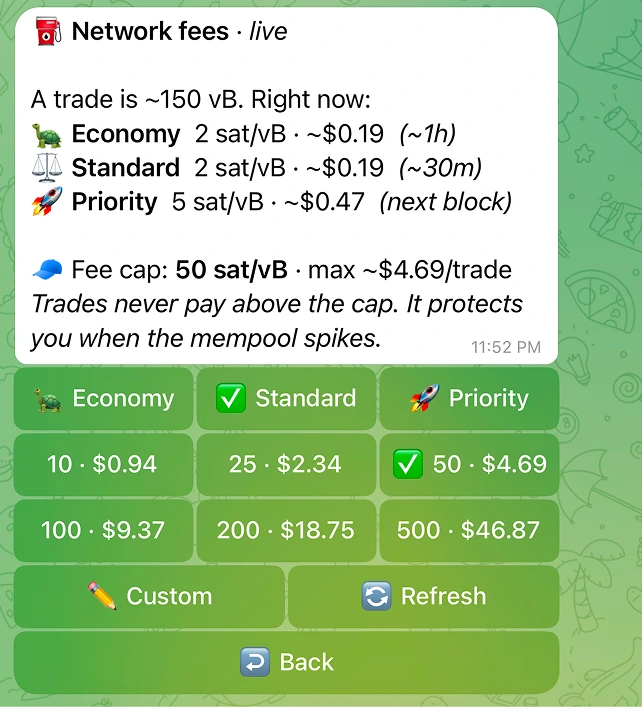
You set a fee cap: the maximum network fee rate the bot will pay, in sat/vB. The default is 50 sat/vB, and you can change it in Settings.
The cap is a hard ceiling. The bot puts it plainly: "Trades never pay above the cap. It protects you when the mempool spikes." If fees spike past your ceiling, the bot holds rather than overpay on your behalf. The Fees panel also shows the cap as a per-trade USD figure ("max ~$X per trade") so you can read it in money, not just sat/vB. Live
The trade-off is the obvious one: too low a cap during a busy mempool, and your trade can stall waiting for fees to come back down. If that happens you will see "Fee cap too low. Raise it in Settings." Raise the cap, or wait for the network to calm.
Fee tiers and their ETAs
When you trade, you pick a fee tier. It sets how aggressively the bot bids for confirmation. The three tiers and the rough ETAs the bot quotes:
| Tier | What it targets | Rough ETA |
|---|---|---|
| Economy | Cheapest rate, willing to wait | ~1h |
| Standard | Balanced, the middle option | ~30m |
| Priority | Highest rate, front of the queue | next block |
The tier selector appears on the token card for a buy, on the position card for a sell, and in the trade previews. You can also set a default tier in the Fees settings panel. The live Fees panel shows each tier's current rate in sat/vB plus USD plus its ETA, computed from the real Bitcoin mempool, so the numbers are not guesses. Live
A higher tier buys priority, not literal speed
This is the part worth internalising. A higher tier does not make Bitcoin run faster. Blocks still arrive on Bitcoin's own schedule, roughly one every ten minutes, no matter what you pay.
What a higher tier buys is confirmation priority: a higher fee rate makes miners more likely to pick your transaction sooner, ahead of lower-paying transactions in the mempool. The ETAs above are estimates of when a transaction at that rate typically confirms given current conditions, not guarantees and not a speed setting.
So:
- Priority does not "speed up" Bitcoin. It pays more so your transaction is favoured for the next block or two.
- Economy is not "slow Bitcoin". It pays less and accepts that you may wait through more blocks.
- In a calm mempool, even Economy can confirm quickly, because there is little competing for block space. In a spike, even Priority can take longer than its usual ETA.
The cap can override your tier
How the two fees relate to slippage
Slippage is a third, separate setting and it is not a fee. It is the maximum price movement you tolerate between quoting a trade and it landing on-chain (default 2%). It does not go to Alkanes or to miners. It is a safety limit: if the pool would fill you worse than your minimum, the swap reverts on-chain and your frBTC is returned to your wallet, rather than fill at a bad price.
The preview keeps these distinct. Price impact (how much your own trade moves the pool) and the swap fee charged by the pool are shown separately from the network fee, so a multi-hop trade's pool fees are never mistaken for slippage. The bot is explicit about it: high-impact warnings note that "the swap fee is separate."
| Item | What it is | Where it goes |
|---|---|---|
| Platform fee | Up to 1% Alkanex fee on the trade | Alkanex |
| Network fee | sat/vB rate to confirm on Bitcoin | Bitcoin miners |
| Pool / swap fee | The AMM pool's own fee, shown in the route | The liquidity pool |
| Slippage | A limit, not a fee | Nobody. It just bounds your fill |
Quick reference
| Setting | Default | Where to change it |
|---|---|---|
| Platform fee | Up to 1% (ceiling) | Not user-adjustable |
| Fee cap | 50 sat/vB | Settings, Fee cap |
| Fee tier | Per trade, plus a saved default | Token card, position card, previews, and the Fees settings panel |
| Slippage | 2% | Settings, Slippage |
Where to read live numbers